

Helix Stadium 1.2 (released December 17, 2025) includes 7 new Agoura amp channels from 3 new amps, the new Showcase playback and automation engine, and numerous improvements and bug fixes and is strongly recommended for all Helix Stadium users.
IMPORTANT! Make sure you also download and install the latest version of the Helix Stadium app, available here:
-
macOS:
https://line6.com/software/readeula.html?rid=13400
-
Windows:
https://line6.com/software/readeula.html?rid=13401
New Amps in 1.2
7 new Agoura amp channels bring the Agoura channel count to 50. If you count the 111 HX channels (and you should), that's 161 amp channels total.
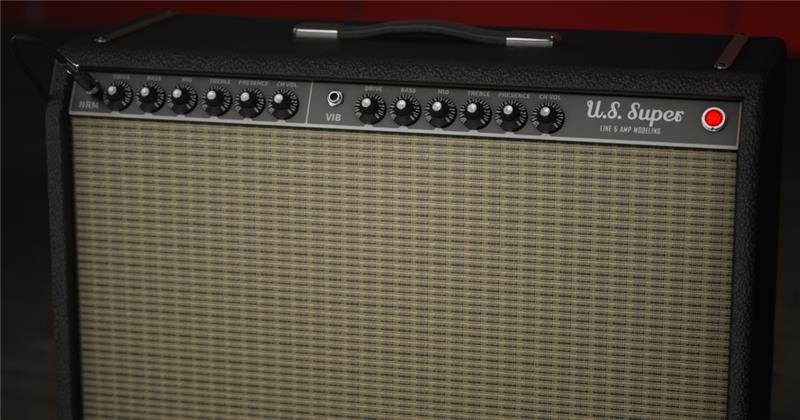
Amp > [data-colorid=j7zwsssbqy]{color:#7f8c8d} html[data-color-mode=dark] [data-colorid=j7zwsssbqy]{color:#727f80}[data-colorid=oywsgqsa0p]{color:#e67e22} html[data-color-mode=dark] [data-colorid=oywsgqsa0p]{color:#dd7519}[data-colorid=fkhwnyfbco]{color:#7f8c8d} html[data-color-mode=dark] [data-colorid=fkhwnyfbco]{color:#727f80}[data-colorid=pycmytpffk]{color:#7f8c8d} html[data-color-mode=dark] [data-colorid=pycmytpffk]{color:#727f80}[data-colorid=f7x87vobhm]{color:#2980b9} html[data-color-mode=dark] [data-colorid=f7x87vobhm]{color:#469dd6}[data-colorid=nwqtbfjusq]{color:#e74c3c} html[data-color-mode=dark] [data-colorid=nwqtbfjusq]{color:#c32818}[data-colorid=h6xpakoufm]{color:#16a085} html[data-color-mode=dark] [data-colorid=h6xpakoufm]{color:#5fe9ce}[data-colorid=bl87i00kpz]{color:#e74c3c} html[data-color-mode=dark] [data-colorid=bl87i00kpz]{color:#c32818}[data-colorid=i5berq63nl]{color:#cc9933} html[data-color-mode=dark] [data-colorid=i5berq63nl]{color:#cc9933}[data-colorid=nx0dqubadt]{color:#e74c3c} html[data-color-mode=dark] [data-colorid=nx0dqubadt]{color:#c32818}[data-colorid=p4lxfvddol]{color:#f1c40f} html[data-color-mode=dark] [data-colorid=p4lxfvddol]{color:#f0c30e}[data-colorid=r9uezzxx9a]{color:#c0392b} html[data-color-mode=dark] [data-colorid=r9uezzxx9a]{color:#d44d3f}[data-colorid=cyto5gz9jj]{color:#e74c3c} html[data-color-mode=dark] [data-colorid=cyto5gz9jj]{color:#c32818}[data-colorid=ycf8wwdu8v]{color:#7f8c8d} html[data-color-mode=dark] [data-colorid=ycf8wwdu8v]{color:#727f80}[data-colorid=t1usz4vyce]{color:#7f8c8d} html[data-color-mode=dark] [data-colorid=t1usz4vyce]{color:#727f80}US Super Black (Normal and Vibrato channels), based on* the Fender ® Super Reverb®
-
ChannelSelects the amp channel or which input is connected. Choose "Normal" or "Vibrato."
-
DriveControls the amount of gain applied to the signal, which influences the level of distortion.
-
BrightWhen this switch is on, applies a high frequency boost.
-
BassControls the low frequency EQ of the tonestack.
-
MidControls the midrange frequency EQ of the tonestack.
-
TrebleControls the high frequency EQ of the tonestack.
-
MasterControls the Master Volume of the amplifier.
-
LevelControls the overall level of the Amp block. Unlike Master Volume, it has no effect on the block's tone.
-
SagControls the amount of sag, or how much the power supply compresses or "droops" in response to striking the strings hard. Higher values provide more touch dynamics, sustain, and organic feel that's inherent in vintage tube amps; lower values offer a "tighter" responsiveness for a more modern feel.
-
RippleControls how much AC ripple interacts with your tone. Power amp circuits will sometimes let a little bit of rectified 120Hz hum (that the power supply filter caps can't quite fully remove) into the audio signal when the power supply is being pushed hard. Much like Hum, Ripple provides a bit of non-musical distortion to the power amp at distorted settings.
-
Z Pre PostDetermines the location of speaker impedance characteristics in the power amp, primarily due to negative feedback. Higher values mean the effects of the interaction appear at the output of the power amp (Post) and lower values mean more of the effect is fed back to the input of the power amp (Pre).
-
HypeDepending on the amp and/or amp settings, increasing Hype may subtly or dramatically adjust various behind-the-scenes parameters to make the amp sound and feel smoother, fuller, punchier, tighter, and/or more forgiving, but at the expense of accuracy.
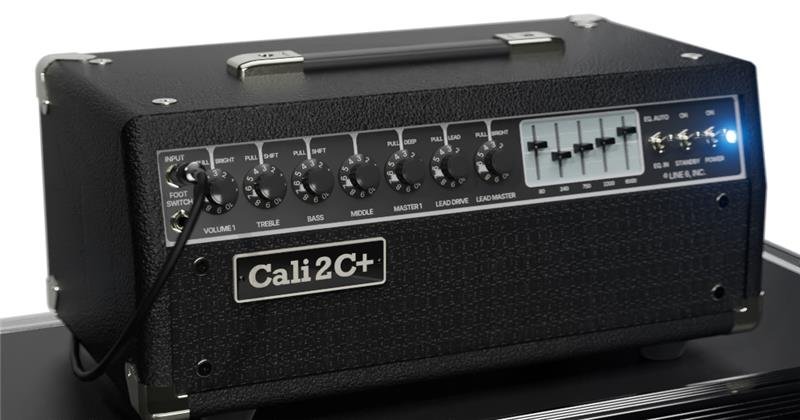
Amp > Cali 2C+ (Normal and Lead channels), based on* the MESA/Boogie ® Mark IIC+
-
ChannelSelects the amp's channel. Choose "Normal" or "Lead."
-
DriveControls the amount of gain applied to the signal, which influences the level of distortion. This parameter affects both Normal and Lead channels.
-
BrightWhen this switch is on, applies a high frequency boost.
-
BassControls the low frequency EQ of the tonestack.
-
MidControls the midrange frequency EQ of the tonestack.
-
TrebleControls the high frequency EQ of the tonestack.
-
PresenceBoosts upper mid and high frequencies in the power amp, resulting in additional punch and bite.
-
DeepWhen this switch is on, boosts the bass frequencies before the graphic EQ.
-
LevelControls the overall level of the Amp block. Unlike Master Volume, it has no effect on the block's tone.
-
BassShiftWhen this switch is on, boosts the bass frequencies at the first gain stage.
-
TrebShiftWhen this switch is on, shifts the treble frequencies of the tone stack lower.
-
BrightWhen this switch is on, applies a high frequency boost. This parameter interacts with the Drive parameter and affects both Normal and Lead channels.
-
LeadDriveControls the amount of gain applied to the signal, which influences the level of the distortion in the Lead channel.
-
LeadBriteWhen this switch is on, applies a high frequency boost. This parameter interacts with the LeadDrive parameter and affects only the Lead channel.
-
LeadMasterControls the Master Volume of the Lead channel of the amplifier.
-
MasterControls the Master Volume of the amplifier. This parameter affects both Normal and Lead channels.
-
PowerSelects the topology of the power amp. Choose "Class A" or "Simulclass"
-
Graphic EQ (80 Hz, 240 Hz, 750 Hz, 2200 Hz, 6600 Hz)The amount of boost and cut is not equal for all bands. This is consistent with the real amp.
-
SagControls the amount of sag, or how much the power supply compresses or "droops" in response to striking the strings hard. Higher values provide more touch dynamics, sustain, and organic feel that's inherent in vintage tube amps; lower values offer a "tighter" responsiveness for a more modern feel.
-
RippleControls how much AC ripple interacts with your tone. Power amp circuits will sometimes let a little bit of rectified 120Hz hum (that the power supply filter caps can't quite fully remove) into the audio signal when the power supply is being pushed hard. Much like Hum, Ripple provides a bit of non-musical distortion to the power amp at distorted settings.
-
Z Pre PostDetermines the location of speaker impedance characteristics in the power amp, primarily due to negative feedback. Higher values mean the effects of the interaction appear at the output of the power amp (Post) and lower values mean more of the effect is fed back to the input of the power amp (Pre).
-
HypeDepending on the amp and/or amp settings, increasing Hype may subtly or dramatically adjust various behind-the-scenes parameters to make the amp sound and feel smoother, fuller, punchier, tighter, and/or more forgiving, but at the expense of accuracy.
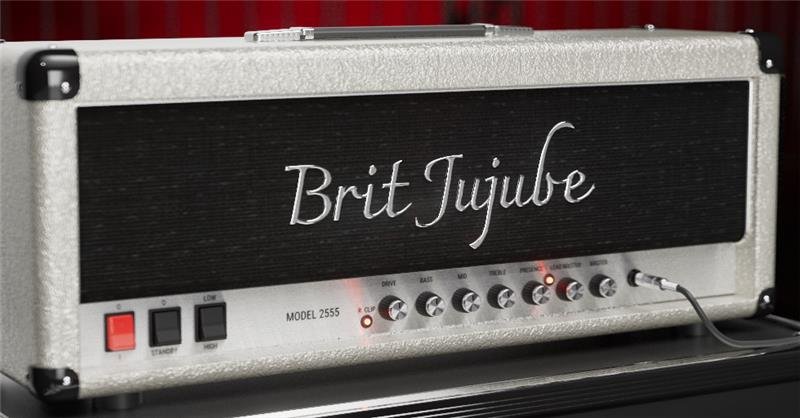
Amp > Brit Jujube (Rhythm, Rhythm Clip, and Lead channels), based on* the Marshall ® Silver Jubilee (2555X)
-
ChannelSelects the amp's channel. Choose "Rhythm," "Rhythm Clip," or "Lead."
-
DriveControls the amount of gain applied to the signal, which influences the level of distortion.
-
BassControls the low frequency EQ of the tonestack.
-
MidControls the midrange frequency EQ of the tonestack.
-
TrebleControls the high frequency EQ of the tonestack.
-
PresenceBoosts upper mid and high frequencies in the power amp, resulting in additional punch and bite.
-
LeadMasterControls the gain level of the Lead channel. This level is after the Drive control and before the Master Volume.
-
LevelControls the overall level of the Amp block. Unlike Master Volume, it has no effect on the block's tone.
-
MasterControls the Master Volume of the amplifier.
-
SagControls the amount of sag, or how much the power supply compresses or "droops" in response to striking the strings hard. Higher values provide more touch dynamics, sustain, and organic feel that's inherent in vintage tube amps; lower values offer a "tighter" responsiveness for a more modern feel.
-
RippleControls how much AC ripple interacts with your tone. Power amp circuits will sometimes let a little bit of rectified 120Hz hum (that the power supply filter caps can't quite fully remove) into the audio signal when the power supply is being pushed hard. Much like Hum, Ripple provides a bit of non-musical distortion to the power amp at distorted settings.
-
Z Pre PostDetermines the location of speaker impedance characteristics in the power amp, primarily due to negative feedback. Higher values mean the effects of the interaction appear at the output of the power amp (Post) and lower values mean more of the effect is fed back to the input of the power amp (Pre).
-
HypeDepending on the amp and/or amp settings, increasing Hype may subtly or dramatically adjust various behind-the-scenes parameters to make the amp sound and feel smoother, fuller, punchier, tighter, and/or more forgiving, but at the expense of accuracy.
*NOTE: All product names used in this document are trademarks of their respective owners and neither Yamaha Guitar Group nor Line 6 are associated or affiliated with them. These trademarks appear solely to identify products whose tones and sounds were studied by Line 6 during sound model development.
New Features in 1.2
Showcase
1.2 introduces Phase 1 of Line 6s all new ShowcaseTM live automation engine (patents pending). Controlling a single guitar or bass rig is so 2015; Helix Stadium can now act as the centerpiece of the entire stage, with automated preset and snapshot recall, automated looper functions, automated MIDI remote control and tempo sync of everything on stage, MIDI, hotkey, or SMPTE audio track-to-video/lighting, and up to eight stereo tracks of audio playback. Its like having a guitar tech, bass tech, keyboard tech, playback tech, video tech, and lighting tech at your beck and call. Showcase helps your band or solo act turn smaller gigs or livestreams into engaging, buzzworthy events and keeps you focused on playing instead of tap dancing on switches all night.
IMPORTANT! Showcase wont change your strings or chip in for beer.

Although it sounds complex, Showcaseat least in 1.2is quite simple. It consists of three basic concepts:
-
8-track song playerSongs with 1 to 8 stereo audio tracks can be transferred to Helix Stadium via Wi-Fi from the Helix Stadium app. Song tracks can be mixed differently for the 1/4", XLR, and Phones outputs from the Matrix mixer.
-
Event sequencer (Flags)One or more events (called flags) can be dragged onto a song's timeline, which tell Helix Stadium (and/or external devices) to accomplish certain tasks, such as recalling a preset or snapshot, engaging a looper function, controlling external stompboxes and synths, switching your real amp's channel, controlling software, and much more. Think of flags like commands from the Command Center screen, except instead of engaged manually, they're triggered automatically at certain points during a song. Collectively, these flags can be used to automate your entire show. Start—Every song has one Start flag at the very beginning that determines the song's time signature and tempo. The Start flag also has the ability to recall a specific preset and snapshot. End—Every song has one End flag at the very end that determines the song's end location, fade out length (if any), and playback behavior for when the song ends. Moving its location trims the end time of the song. Marker—Used to jump to various locations in a song and for rearranging your song on the fly during performance. The flag top on the Song screen displays a small yellow pause icon when its Pause at Marker is set to "On". As with Start flags, Marker flags can also recall a specific preset and snapshot. Cycle—Cycles a section of the song for repeated jamming. Cycle Start and End points can also be entered in real time by pressing Transport mode's Cycle footswitch. Preset/Snap—Used to automatically switch presets and/or snapshots during a song. Note that Start flags and Markers can also recall presets and/or snapshots, so these may be unnecessary. Looper—Used to automate looper functions within Helix Stadium itself. For example, you could place a Looper > Record flag at the beginning of the first chorus, a Looper > Stop flag at the end of the chorus, and a Looper > Play flag at the beginning of the second chorus. Playing the song will automate these functions so you could harmonize with what you played in the first chorus durning the second chorus, without pressing a single footswitch. Utility—A catch-all for additional functions that allow Helix Stadium to control itself, including turning the click on and off, engaging the tuner, starting and stopping the stopwatch, and more. Ext Amp—Used to automatically switch external amps' channels and/or reverb. Same as Ext Amp commands except they happen automatically. MIDI—Transmits a MIDI message from both MIDI DIN and USB. Currently supports Bank/Program, CC, and MMC messages. Can be used to recall presets and control parameters in your external stompboxes, synths, keyboards, or with a MIDI-to-DMX converter, even lighting. Hotkey—Transmits a QWERTY HID command (with or without modifiers, such as Shift, Alt, and Command) via USB. Basically the same thing as a Hotkey message on the Command Center page, except it's automatically sent during song playback. Can be used to start/stop a Quicktime video, advance Powerpoint slides, or if you're really ambitious and bored, type an angry email to your boss. Time—Each song's Start flag determines the song's initial tempo and time signature, but additional Time flags can be added anytime the song's tempo and/or time signature changes.
-
PlaylistsMuch like in Spotify or Apple music, one or more songs can be organized into playlists, and then recalled and otherwise navigated from Transport footswitch mode, dedicated Transport buttons below the Volume knob, or the Song screen's Transport panel. Helix Stadium can store up to 512 songs in the Song Library folder (determined by song length, number of tracks, and microSD card size), and up to 127 playlists can be created, each containing up to 128 songs from the Song Library folder.
For more information on Showcase, see the Helix Stadium Owner's Manual.
Bug Fixes in 1.2
-
In some cases, Global Settings > Ins/Outs > 1/4" Output Level and XLR Output Level would appear set to "Line" but were actually outputting Instrument/Mic levelFIXED
-
Global Settings > Ins/Outs > Mic In Gain was set lower than intended under the hoodFIXED IMPORTANT! Manual adjustment is required for the fix to take effect. Be careful as this will result in the level increasing
-
Presets could occasionally load at a lower output level than expectedFIXED
-
In some cases, enabling snapshot control of parameters and then adjusting them from Focus view would not be recalled correctly by SnapshotsFIXED
-
With some presets imported from Helix/HX, changing snapshots could cause the main LCD to rebootFIXED
-
In some situations, main LCD and scribble strip displaying of tempo could be inconsistentFIXED
-
If a Looper block is auto-assigned to a Stomp switch, it can become unresponsiveFIXED
-
Overwriting a preset can append "(1)" to the preset nameFIXED
-
In certain cases, assigning a MIDI CC to an expression pedal via the Command Center could cause the screen to rebootFIXED
-
Helix Stadium app: In rare cases, selecting models from the editor could exceed DSP limits, risking a crashFIXED
-
Helix Stadium app: None block could show editable parametersFIXED
-
Helix Stadium app: Adjusting Input > Instrument 1+2 and Inst 2 > Input Z value would not update the hardwareFIXED
-
Helix Stadium app: Exporting a preset and then re-importing it could sometimes fail to correctly recall which block is selectedFIXED
-
Helix Stadium app: When assigned from the editor, some snapshot bypass assignments are not always recalledFIXED
-
Helix Stadium app: In rare cases, when importing various presets from Helix/HX, blocks' snapshot bypass state was not always recalled correctlyFIXED
-
Helix Stadium app: When duplicating a large number of setlists in the editor, an error could occurFIXED
-
We have addressed some issues that could prevent logging in to the Helix Stadium application
-
General fixes around footswitch assignments and Command Center, including looper assignments and custom colors
-
General fixes around Helix/HX preset and asset import
-
General performance improvements and UI cleanup
-
Many other fixes and improvements
Known Issues
-
Drastic gain changes between Snapshots can create volume dips and/or surges. Improvements are in progress
-
Wi-Fi connection appears established on the device but is not actually connected to the internet. In this case, disconnect and reconnect to the network on Stadium to reestablish connection
-
After sitting for an extended period of time, the DSP may become unresponsive. Power-cycling restores functionality so for now, restart Helix Stadium between each session.
-
If a block is auto-assigned to a Stomp B footswitch, it may affect Stomp A on the same switch
-
Importing longer WAV files (example: convolution reverb impulses) as Cab IRs may cause the unit to freeze on the splash screen. If this occurs, clear Impulse Responses using Maintenance Mode. (Hold HOME+SONG while booting)
-
After importing many IRs, the next time Helix Stadium is turned on, boot time is much slower. Subsequent power ups boot as normal.
-
Clearing a command can lead to loss of Snapshot Ctrl of block bypass states
-
On very rare occasions the unit can repeatedly reboot on startup. Power cycle once to get out of the boot loop
-
The click may briefly appear out of sync when beginning song playback
-
Several Hotkey flag > Keystroke values are incorrect. Setting the value to "-" is actually a space bar, and subsequent values are off by 1
-
If Marker > Pause at Marker is turned on, any preset and/or snapshot assigned to the marker is recalled, even though it shouldn't until Play is engaged
-
If Showcase Start or Time flags have time signatures with an 8 or 16 denominator, the click may appear uneven
-
On the Song screen, Visual position may unexpectedly go out of range when zooming or adjusting marker position
-
Helix Stadium app: The following Edit Menu key commands/shortcuts are not yet implemented: Undo, Redo, Cut, Copy, Paste